I just came back from Hack the North 2026. Although it was disappointing that our team did not make it out of the semifinals round of judging, I still think our project is cool enough to give it some form of documentation at least. Our submission, Living NPC, renders agentic NPCs in a 3D scene with procedural lip sync, conversational gaze, skeletal animation, shadow mapping, and a day/night cycle, all on a custom Vulkan engine I wrote from scratch in C++.
What did we make
The idea was to make NPCs that actually feel alive. You walk up to a character in a 3D scene, speak to them through your mic, and they respond with a real voice, moving lips, shifting eyes, and body language. The whole thing runs on a Vulkan engine I wrote from scratch.
I worked with Raymond, where I did the rendering and Animations (Vulkan engine, glTF model loading, morph target blending, skeletal skinning, procedural lip sync + eyes, shadow mapping, skybox, building the 3D scene in Blender). Raymond built the agent side of NPC personalities + memory driven by an LLM, speech-to-text with faster-whisper for player input, and OpenAI for generating NPC dialogue (probably more stuff too but I am not knowledagble enough in this field to list out everything).
We needed a clean interface between the two halves since we were writing in different languages (my side is C++, his is Python). We decided on a shared directory of JSON files. Raymond's agents write JSONL conversation files for each spoken NPC line:
// example of the .jsonl file, written by the game agents

{"seq": 0, "speaker_id": "Elara", "phase": "start", "gender": "female",
 "text": "Welcome, traveler. What brings you here?"}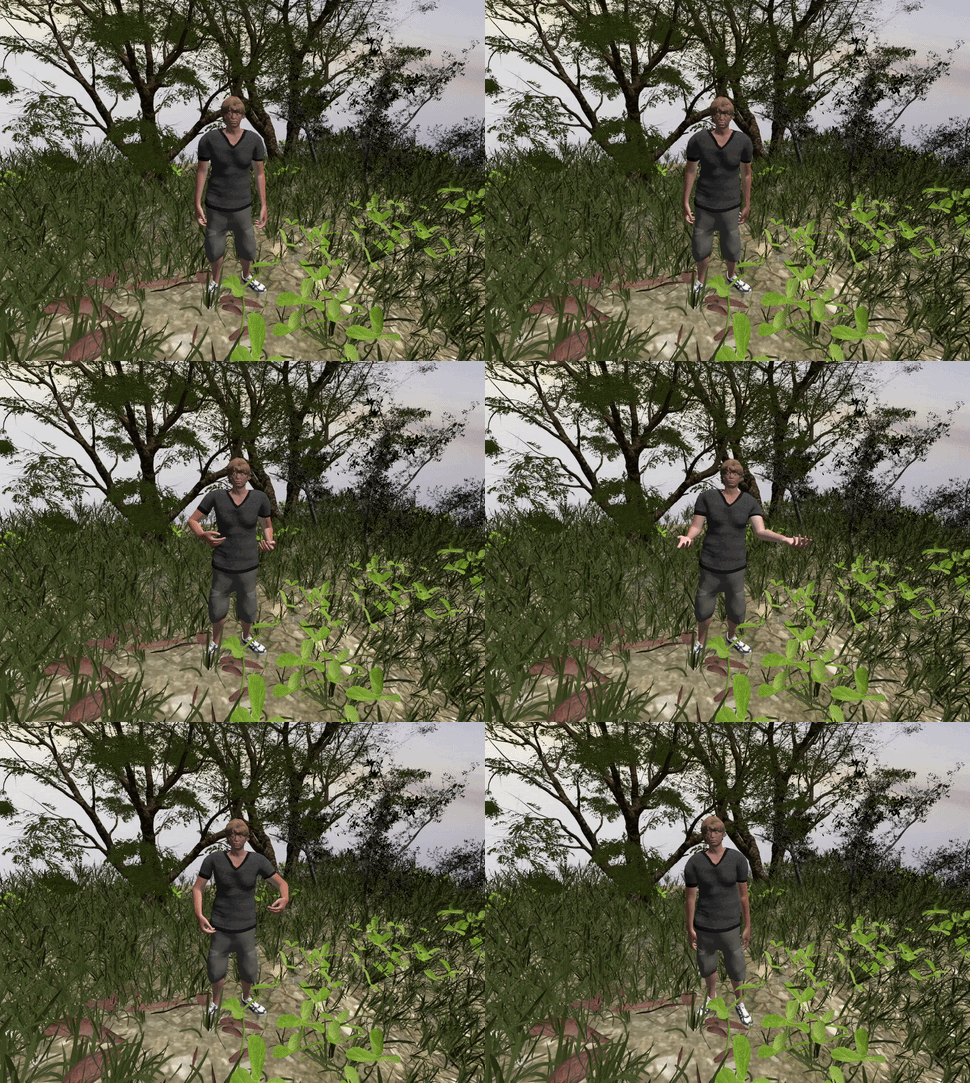
An active.json pointer tells my renderer which conversation
to play and which NPC speaker slots are involved. A separate
npc_state.json carries NPC positions and the in-game time.
On my side, I poll those files every 250ms, grab the next line of text,
send it to Azure TTS for audio and viseme timing, run that through my
procedural animation system, and render the result.
I write back spoken.json with the last seq I
finished speaking, so Raymond's side knows when a line has been
heard, syncing the 2 sides together.
Facial Animations
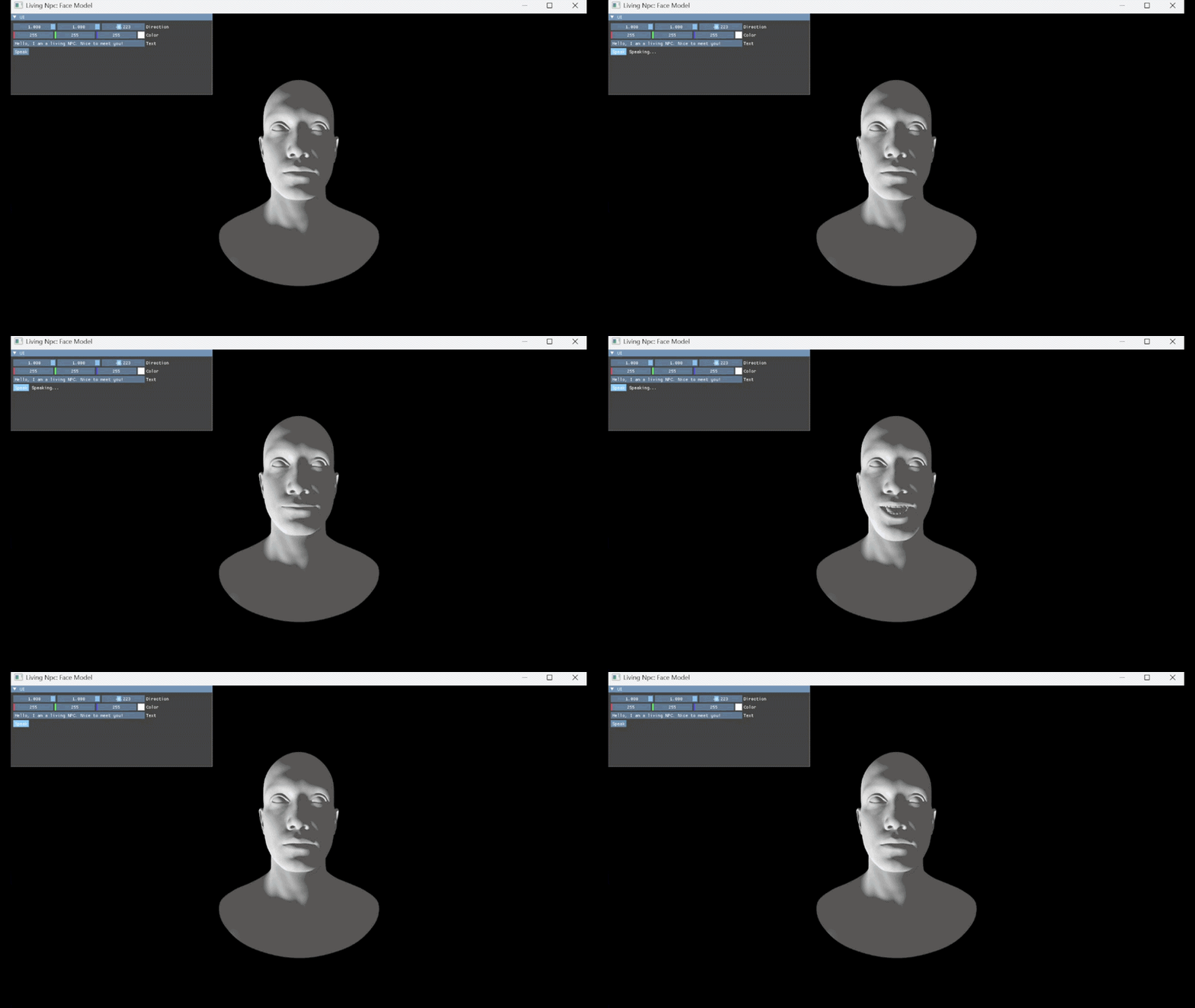
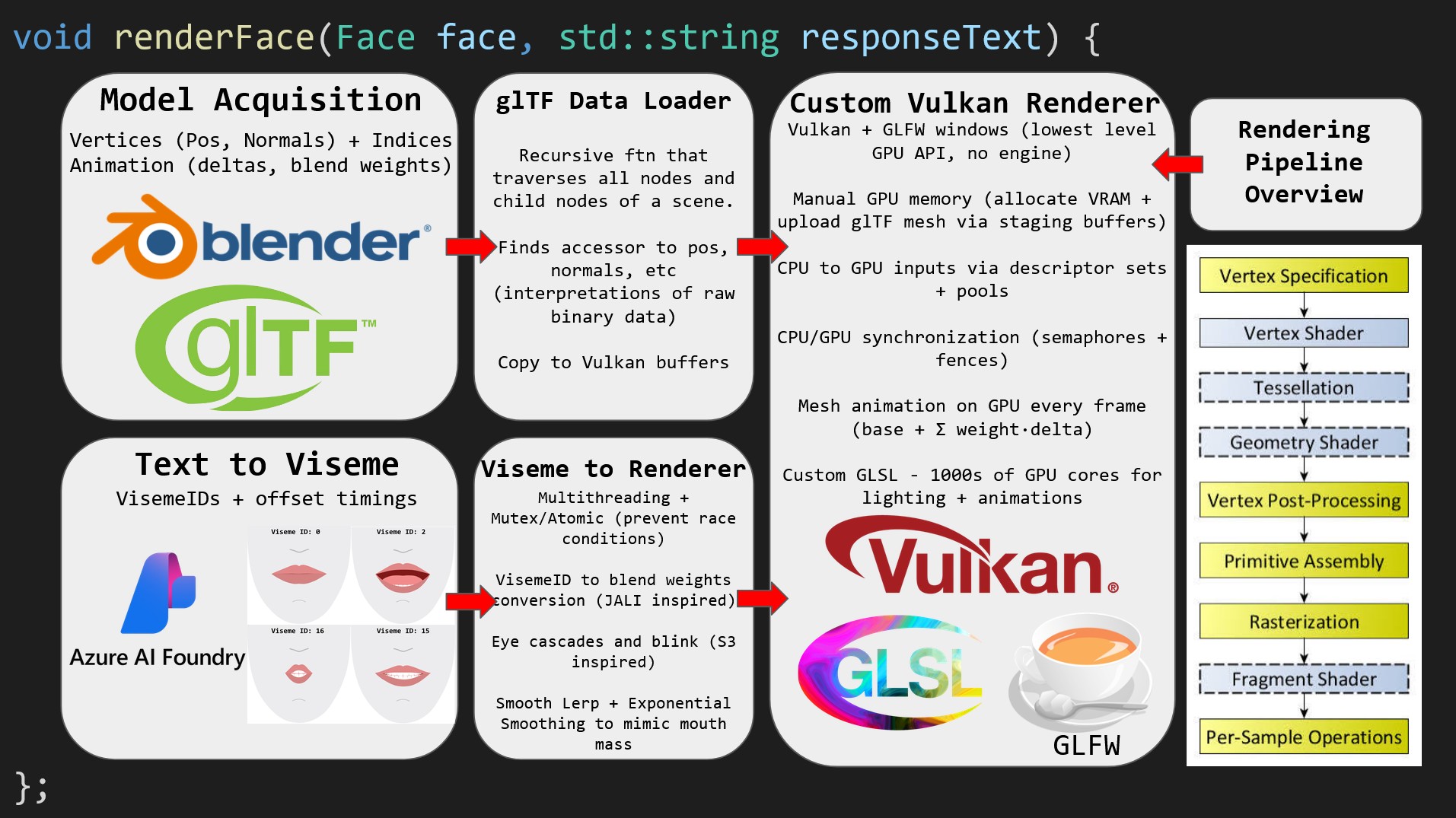
I wanted the faces to look like they were actually talking, not just flapping a jaw open and shut. I read through the JALI[2] and S3[3] papers and took what I could use from them. From JALI I grabbed the idea of bilabial closure dominance and coarticulation for lip-heavy sounds, and from S3 I grabbed the gaze state machine (how often to look away, when to do microsaccades, etc). Every frame, each NPC's face runs through our animation pipeline: morph target blending for mouth shapes, procedural lip syncing pipeline that drives those shapes from audio, a gaze state machine for the eyes, and skeletal skinning for the body.
Morph Targets
The character face is an ARKit-compatible glTF
mesh with 51 morph targets[4].
These are blendshapes like jawOpen,
mouthSmile_L, eyeBlink_L, etc.
Each target stores a per-vertex position delta, so "jawOpen"
is how far the relevant vertices of the face moves when the jaw opens.
A weight between 0 and 1 controls how much of that delta gets applied.
I put all the deltas into one flat SSBO at load time (~20 MB, uploaded once). A second SSBO holds the current weights, one float per target, which I memcpy from the CPU every frame. The vertex shader loops over them:
// shader.vert - morph target blend
vec3 pos = inPosition;
uint localVert = gl_VertexIndex - PushConstants.vertexOffset;
for (uint t = 0; t < PushConstants.targetCount; t++) {
    uint weightIndex = PushConstants.weightBase
                     + PushConstants.weightsStartIndex + t;
    float w = weightBuffer.weights[weightIndex];
    if (w == 0.0) continue;

    uint index = PushConstants.morphStartIndex
               + t * PushConstants.vertexCount + localVert;
    pos += w * morph.deltas[index].xyz;
}
Since all submeshes share the same flat buffers, each draw call needs its own push constants so the shader knows where to index into them. The push constants struct was later expanded to handle other parts of the animations too and for world generation:
// shader.vert's push constants
layout(push_constant) uniform MorphPush {
    mat4 model;
    vec4 baseColor;
    uint morphStartIndex;   // where this submesh's deltas start
    uint targetCount;       // how many targets this submesh has
    uint vertexOffset;      // gl_VertexIndex to local index
    uint vertexCount;       // stride between targets in the SSBO
    uint weightsStartIndex; // where this submesh's weights start
    uint weightBase;        // offset for this NPC's weights
    uint useTexture;
    uint isSkinned;
    uint jointBase;
    uint instanced;
    uint instanceOffset;
} PushConstants;
I went with an SSBO over a UBO for the weights since std140 pads every float to 16 bytes which felt wasteful for 51 weights. std430 in an SSBO packs them tight.
Procedural Lip Syncing
Azure AI's TTS did provide viseme IDs, but they did not
line up with my ARKKIT face model and I did not want to just take Azure's blendshape
output as a black box. So instead, I built my own lip
sync pipeline inspired by the JALI paper[2]
(SIGGRAPH 2016). Azure TTS gives me a VisemeReceived
callback with a viseme ID (0 to 21) and an audio offset in
milliseconds. I use that purely as a forced aligner that tells
me which mouth shape should play when. The actual animation comes
from a 22-entry weight table I hand-tuned by posing the face with
ImGui sliders and writing down the values.
Every frame, sample()
finds the current viseme from the track and
lerps between it and the next one over the gap
between them. On top of that base interpolation
I ended up adding several layers, each one fixing
a problem I noticed while testing:
Apex hold. The first thing I noticed was that every viseme was permanently mid-transition and looked wrong. Nothing ever fully articulated and it looked like the lips were just flapping up and down. My fix was to hold the current pose for 60% of the gap before starting the lerp to the next one. This gives the smoothing filter a stationary target to converge on before it has to start moving again.
// faceAnimator.cpp's apex hold with smoothstep transition
f32 rawT = (f32)timeElapsed / transitionTime;
f32 holdRatio = 0.6f;
f32 t = (rawT < holdRatio) ? 0.0f : (rawT - holdRatio) / (1.0f - holdRatio);
t = t * t * (3.0f - 2.0f * t); // smoothstep
Exponential smoothing. Just lerping
between viseme poses looked mechanical. The mouth had no
weight to it, it would just teleport between shapes. I added
an exponential filter on each weight so the mouth eases in and
out of poses instead of snapping. The issue I ran into was that
the laptop I was using only had VK_PRESENT_MODE_MAILBOX_KHR which
has no vsync cap, so the engine runs at 1000+ FPS. A fixed
per-frame alpha like displayed[i] += 0.3f *
(target[i] - displayed[i]) meant the smoothing
basically disappeared at high FPS since it was being
applied a thousand times a second, so the fix was to make
alpha frame independent:
// faceAnimator.cpp's frame independent smoothing
u32 dt = frameMs - lastFrameMs;
lastFrameMs = frameMs;
f32 alpha = 1.0f - std::exp(-(f32)dt / 40.0f);

// then per weight:
displayedWeights[i] += alpha * (target[i] - displayedWeights[i]);
Bilabial closure. Sounds like p, b, and m (viseme 21) need the lips to fully close, but the lerp and smoothing weakened this closure where it was not always visible. I tested the static pose with the ImGui sliders and it looked fine, so the pose itself was correct and the problem was purely the dynamics smoothing it away. The fix I did was adding a triangular envelope that overrides the displayed pose around the bilabial's apex, applied after the smoothing so it cannot be softened:
// faceAnimator.cpp - bilabial dominance envelope
f32 dist = (f32)std::abs((i32)sampleMs - (i32)apexMs);
f32 halfWidth = (sampleMs < apexMs) ? 80.0f : 120.0f;
f32 envelope = 1.0f - std::min(dist / halfWidth, 1.0f);

for (u32 j = 0; j < displayedWeights.size(); j++)
    displayedWeights[j] += envelope * (closedWeights[j] - displayedWeights[j]);
Lip-heavy anticipation. Rounded sounds like "oo", "oh", "w", and "sh" start early in real speech, where the lips begin rounding before the sound hits. I used a sliding window that checks nearby entries, and for each rounded viseme, it blends in its own envelope. A first version just picked one per frame, which caused a snap on adjacent rounded visemes (like "show" = sh + o) because the second one got no onset ramp. The overlapping window fixed that by letting them cross-fade.
Lead-compensation. After all of this, the face was still ladding behind the audio by about one time constant (~40 to 50ms). Since we were under a time constraint, fix I decided was to just offset all viseme timing reads 60ms into the future so the smoothing's lag gets cancelled and the lips land on the audio rather than behind it. Audiovisual sync perception is asymmetric, a mouth slightly ahead of the sound looks fine because that is how real speech works, but a mouth behind the sound reads as dubbed.
// faceAnimator.cpp - the full sample() call chain
std::vector<f32> HTN::faceAnim::sample() {
    std::lock_guard<std::mutex> lock(mtx);

    u32 frameMs = eyeClock.elapsedMs();
    u32 dt = frameMs - lastFrameMs;
    lastFrameMs = frameMs;
    f32 alpha = 1.0f - std::exp(-(f32)dt / 40.0f);

    u32 nowMs = clock.elapsedMs();
    u32 sampleMs = nowMs + 60; // lead-compensation

    // find current viseme, lerp + apex hold, then layer the fixes
    // ...
    exponentialSmoothing(weightChange(srcWeights, dstWeights,
                                      transitionTime, timeElapsed), alpha);
    applyBilabialDominance(sampleMs, current);
    applyLipHeavyTiming(sampleMs, current);
    applyEyeMovementWeights(frameMs, alpha);
    blinking(frameMs);

    return displayedWeights;
}
S3 Conversational Gaze
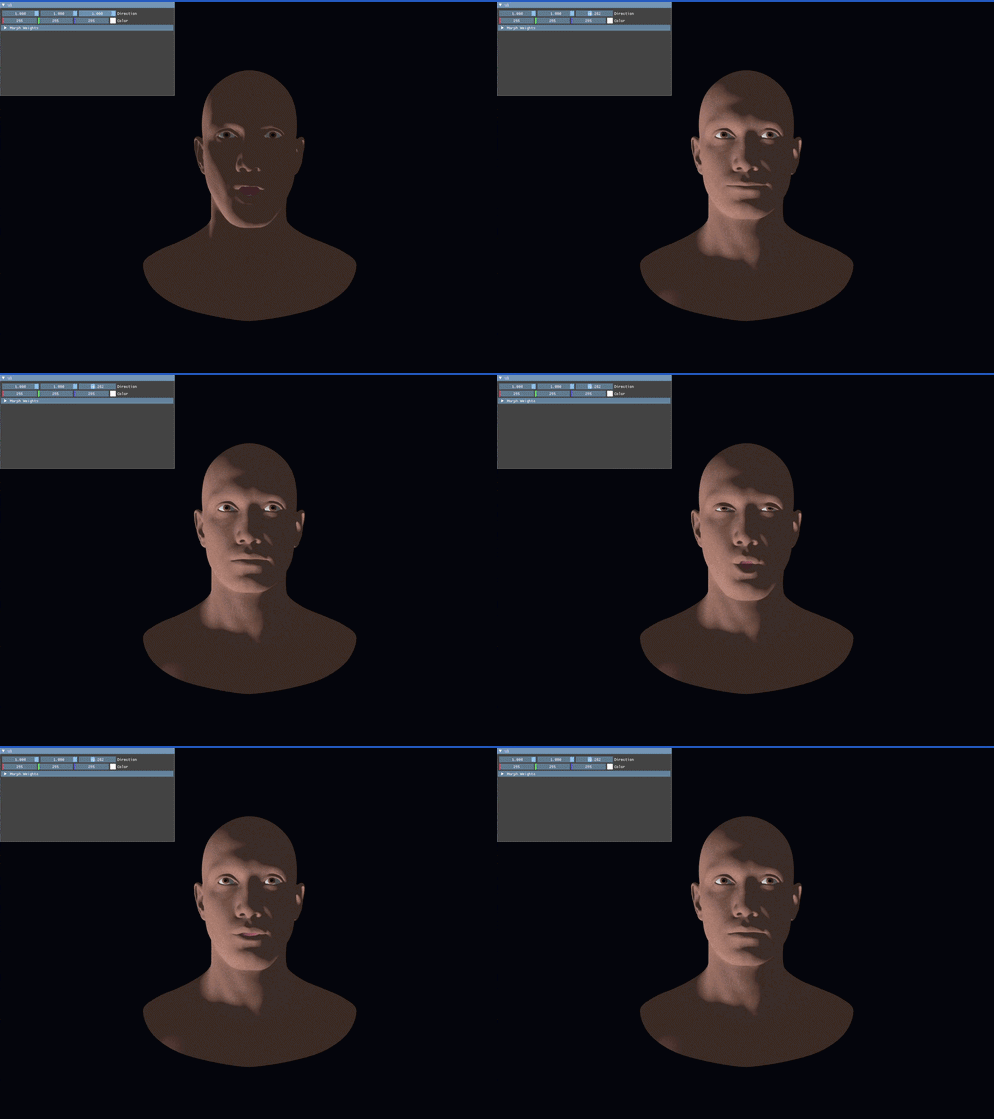
Without any eye movement the character just stares at you and it feels really ackward. I based the eye behavior on the S3 paper[3] (ACM TOG 2024, Karan Singh / JALI Research), which studies how people actually move their eyes during a conversation.
It is a state machine with two states: FOCUS (looking at the player) and AVERT (looking away). When the NPC is speaking, the probability of averting is higher (0.6 vs 0.3), which matches how real speakers break eye contact more than listeners. Each state lasts a random duration (FOCUS: 1 to 2s, AVERT: 0.7 to 1.6s). During FOCUS, the eyes do tiny microsaccades every ~300ms to avoid a dead stare. These are just scaled-down versions of the avert gaze shift. Blinks run on their own separate timer with a triangular envelope over about 80ms.
// faceAnimator.cpp - gaze state machine
void HTN::faceAnim::applyEyeMovementWeights(u32 nowMs, f32 alpha) {
    if (nowMs >= nextTransitionTimeMs) {
        if (eyeState == "FOCUS") {
            f32 chance = isBusy() ? 0.6f : 0.3f;
            if (distr(gen) < chance) {
                eyeState = "AVERT";
                pickAvertEyeLocation(1.0f);
                nextTransitionTimeMs = avertWaitTime() + nowMs;
            } else {
                focusLocation();
                nextTransitionTimeMs = focusWaitTime() + nowMs;
            }
        } else {
            eyeState = "FOCUS";
            focusLocation();
            nextTransitionTimeMs = focusWaitTime() + nowMs;
        }
    }
    // microsaccades during FOCUS
    if (nowMs >= cascadeTransitionTime && eyeState == "FOCUS") {
        focusLocation();
        pickAvertEyeLocation(0.05f * distr(gen));
        cascadeTransitionTime = nowMs + 300.0f * distr(gen);
    }

    for (u32 idx : eyeIndices) {
        currentEyeWeights[idx] += alpha
            * (targetEyeWeights[idx] - currentEyeWeights[idx]);
        displayedWeights[idx] = currentEyeWeights[idx];
    }
}
Skeletal Skinning
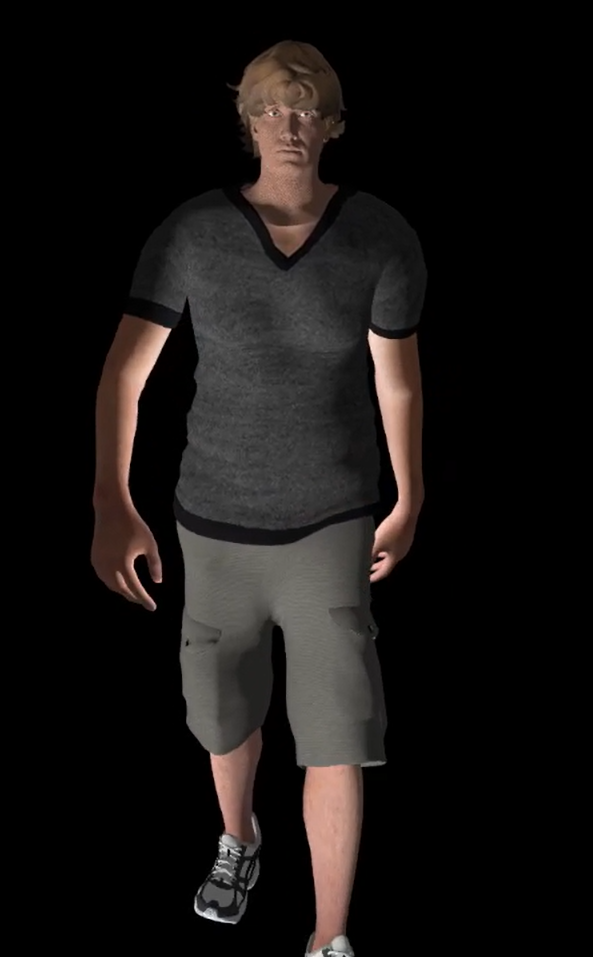
For the body animations I did skeletal skinning.
The loader pulls JOINTS_0, WEIGHTS_0,
and the inverse bind matrices out of the glTF.
Each frame I walk the joint hierarchy and write the final
transforms into a palette SSBO, then the vertex shader
blends up to 4 joints per vertex:
// shader.vert - skeletal skinning (runs after morph blend)
if (PushConstants.isSkinned == 1u) {
    uint jb = PushConstants.jointBase;
    mat4 skin = inWeights.x * palette[jb + inJoints.x]
              + inWeights.y * palette[jb + inJoints.y]
              + inWeights.z * palette[jb + inJoints.z]
              + inWeights.w * palette[jb + inJoints.w];
    pos = vec3(skin * vec4(pos, 1.0));
    normal = mat3(skin) * inNormal;
}
This runs after the morph target blend,
so the face deformation happens in local space
and then the skeleton places it in the world.
The normal also gets transformed by the skinning
matrix so the lighting stays correct on the deformed
mesh. The character models I used are Mixamo bodies
with the ARKit blendshape head added on in Blender
and skinned to the mixamorig:Head joint.
3D World
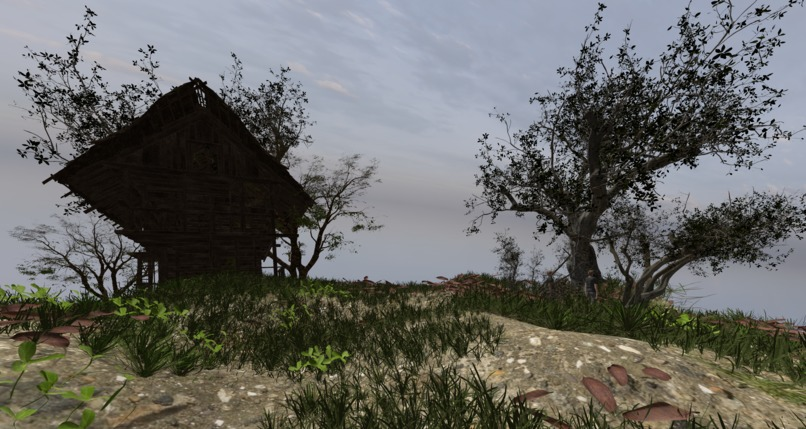
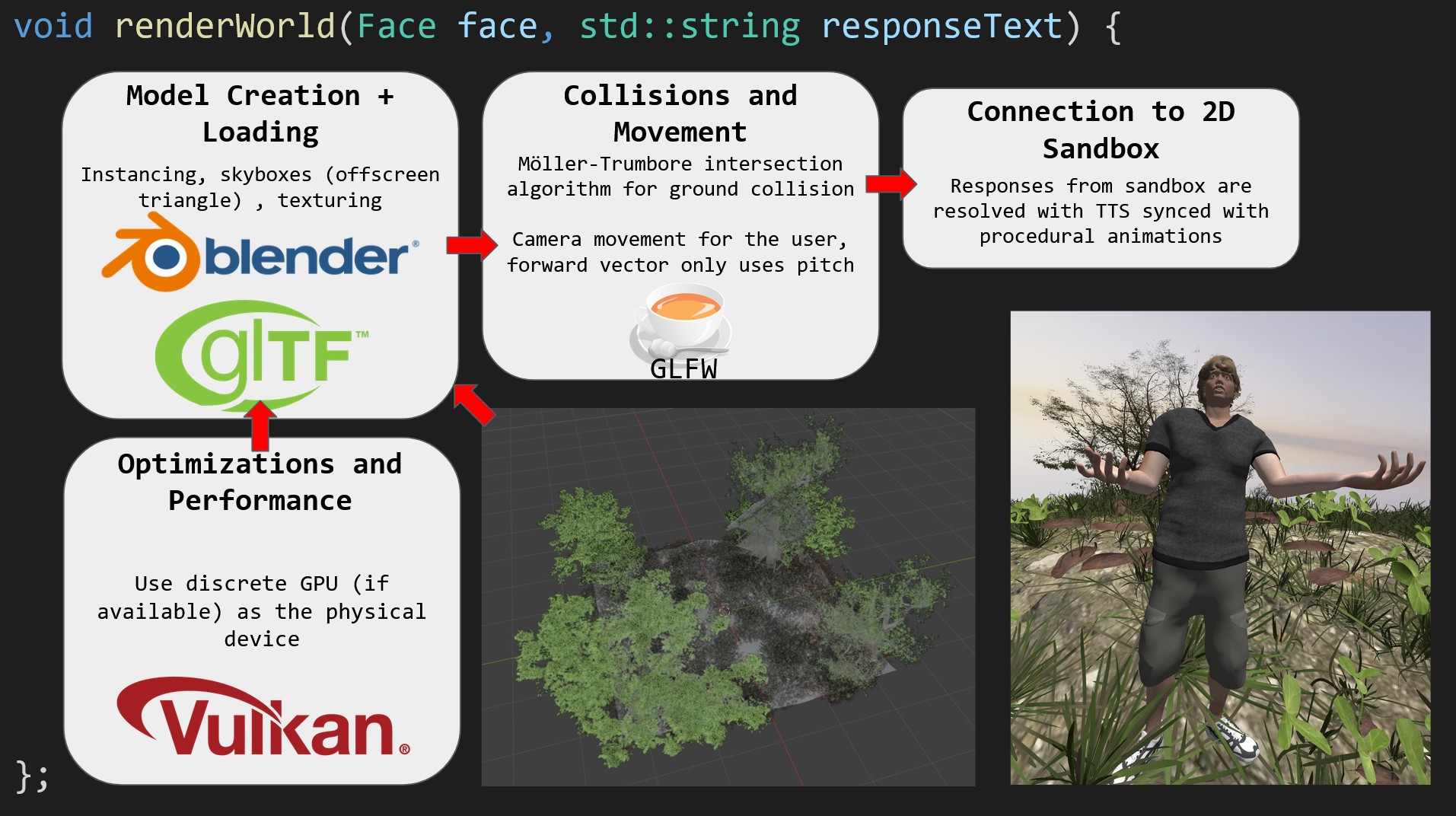
glTF Loading
Everything gets loaded through glTF (including the face, bodies, and animations too from the last part)
via cgltf[1]. The loader
walks the scene graph recursively with recurseNodes,
reading positions, normals, texture coordinates, joint indices/weights,
and morph target deltas for each primitive. For static geometry
I bake the world transform directly into the vertices at load time.
Skinned meshes stay in local space because the joint palette handles
placement in the vertex shader.
// modelLoading.cpp - top level loader
bool HTN::Loader::loadModel(const std::string modelPath, fModel& out,
                            Skeleton& skeleton, bool instanced) {
    cgltf_options options = {};
    cgltf_data* data = NULL;

    if (cgltf_parse_file(&options, modelPath.c_str(), &data) != cgltf_result_success)
        throw std::runtime_error("Failed to parse gltf");

    if (cgltf_load_buffers(&options, data, modelPath.c_str()) != cgltf_result_success)
        throw std::runtime_error("Failed to load gltf buffers");

    u32 weightBase = 0;
    for (cgltf_size i = 0; i < data->scene->nodes_count; i++)
        recurseNodes(data->scene->nodes[i], out, weightBase);

    skeleton.data = data;
    skeleton.skin = data->skins_count ? &data->skins[0] : nullptr;
    skeleton.anim = data->animations_count ? &data->animations[0] : nullptr;
    return true;
}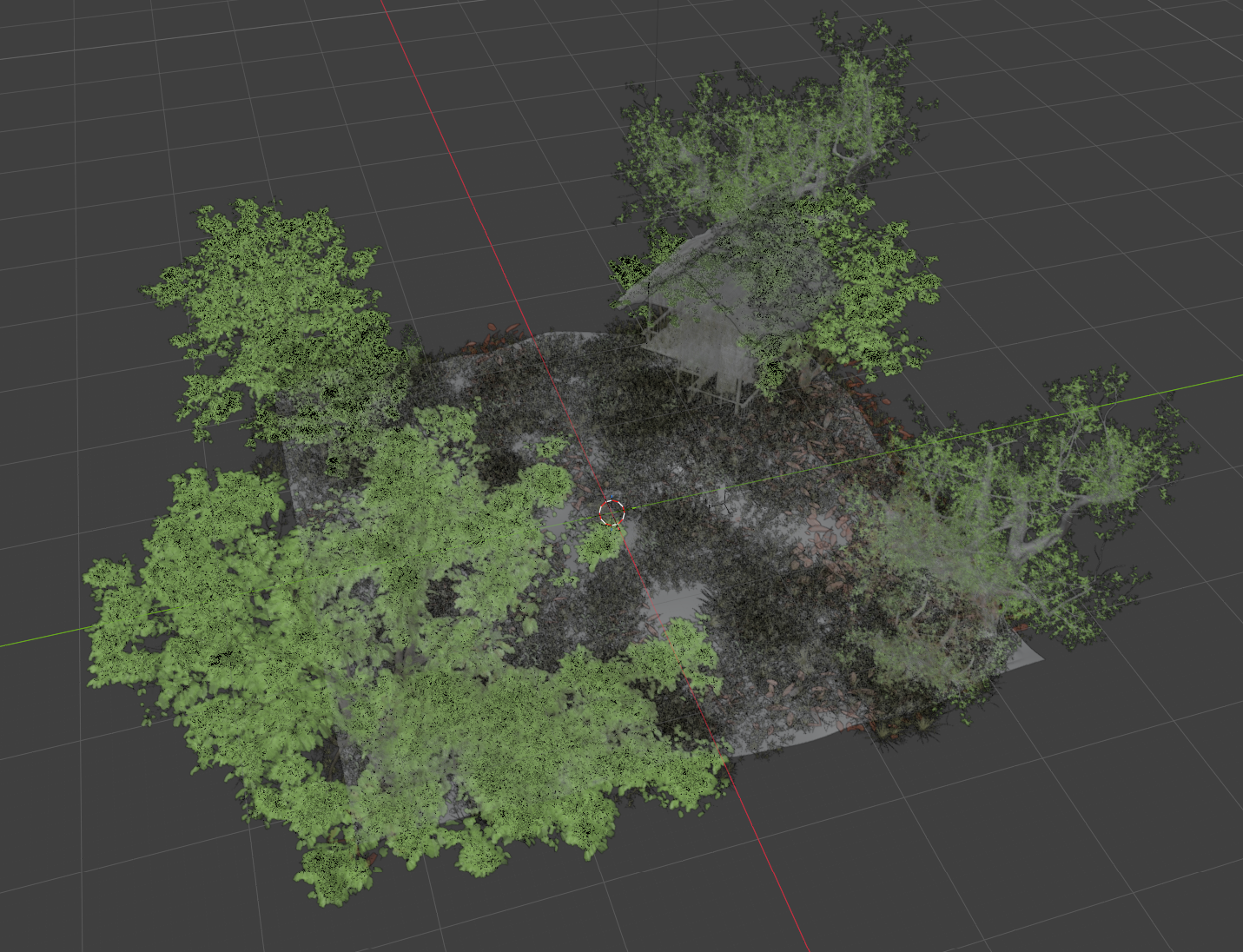
I built the scene in Blender using the BioMe plugin to scatter grass,
foliage, and props across the terrain really quickly (it took me maybe 10 minutes to make the whole blender scene?).
glTF does not carry the Geometry Nodes procedural graph,
so I had to put the scatter into real mesh instances
before exporting. The exported .gltf ends
up with hundreds of instances of just a few unique meshes.
On the engine side, the loader calls
collectMeshInstances which walks the
scene graph and groups every node by its mesh pointer.
Then buildInstancedMesh loads each unique mesh once in
local space and collects one world-space transform per instance
into an SSBO. The vertex shader picks the right one with
gl_InstanceIndex:
// shader.vert - instanced rendering
mat4 worldMat = PushConstants.model;
if (PushConstants.instanced == 1u) {
    worldMat = instanceBuffer.instances[PushConstants.instanceOffset + gl_InstanceIndex];
}

vec4 worldPos = worldMat * vec4(pos, 1.0);
gl_Position = ubo.proj * ubo.view * worldPos;
Ground Collision
I needed both the camera and the NPCs to walk on the terrain since the ground plane
had uneven ground, so I implemented Moller-Trumbore ray-triangle intersection.
The scene mesh gets loaded into a CollisionMesh and spatially
indexed into a GroundGrid, which is a cell-based hash map.
Each frame I cast a ray straight down from the camera and from
each NPC, and snap them (smoothly) up or down whatever triangle they are standing on:
// main.cpp - ground snapping for the camera
f32 floor = Raycast::getGround(camera.getPos(), renderer.getCollision(),
                               renderer.getGroundGrid());
if (floor != -999.0f) {
    enginemath::Vec3 pos = camera.getPos();
    pos.y = floor + 3.3f;
    camera.setPos(pos);
}
Without the grid it was way too slow since the scene
has thousands of triangles. With a cell size of 4 units,
getGround only tests the triangles in the cell
the ray lands in, increasing performance.
NPC Management
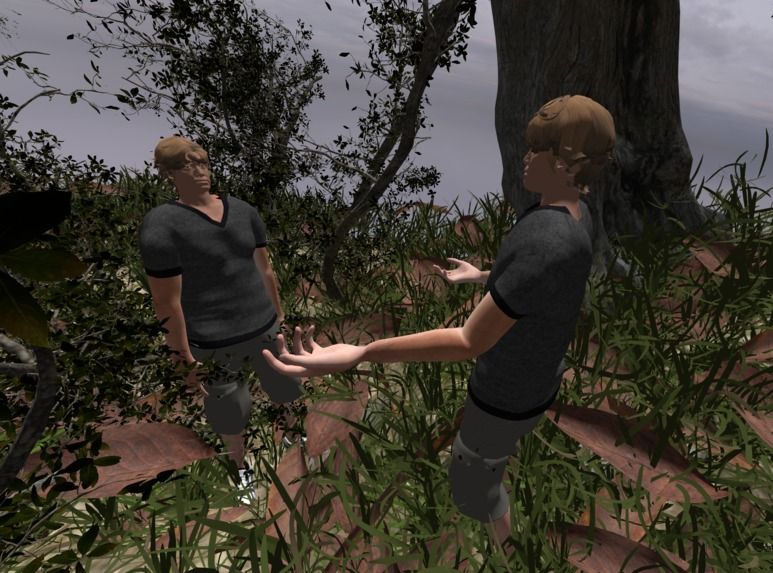
Each NPC has its own faceAnim, skeleton,
and animation state. I wanted the NPCs to be able to walk
around the scene, so I gave them three animation states:
IDLE, WALK, and TALK. Switching between them cross-blends
over 0.3 seconds so the transitions look sort of natural.
The game agents write NPC positions into
npc_state.json as normalized
0 to 1 coordinates on a 2D map. Every 250ms
I read that file and lerp each NPC smoothly
toward its target position in world space.
When an NPC is in a conversation with the player,
it faces toward the camera instead of its movement
direction (which looks kind of creepy now that I'm rewatching our demo video).
Audio playback is distance-attenuated per
NPC so you hear whoever is closest, and you can also hear multiple convos at once too with different volume levels on each:
// main.cpp - distance dependant volume
float dx = camera.getPos().x - npcWorldPositions[s].x;
float dz = camera.getPos().z - npcWorldPositions[s].z;
float dist = sqrtf(dx * dx + dz * dz);
const float fullVolDist = 5.0f;
const float fadeOutDist = 30.0f;
float vol = 1.0f - std::clamp((dist - fullVolDist) / (fadeOutDist - fullVolDist),
                               0.0f, 1.0f);
renderer.getFace(s).setVolume(vol * vol);
Shadow Mapping and Lighting
I wanted shadows to ground the NPCs in the scene. I have a shadow pass that renders depth from the light's perspective into a 2048x2048 depth-only framebuffer, and the main pass samples that to figure out what is in shadow. The fragment shader handles the shadow lookup, alpha clipping for grass, fog, and lighting all in one place:
// shader.frag - shadow lookup
vec4 lightClip = light.lightViewProj * vec4(fragWorldPos, 1.0);
vec3 projCoords = lightClip.xyz / lightClip.w;
projCoords.xy = projCoords.xy * 0.5 + 0.5;

float closestDepth = texture(shadowMap, projCoords.xy).r;
float currentDepth = projCoords.z;
float bias = max(0.005 * (1.0 - nDiff), 0.001);
float shadow = currentDepth - bias > closestDepth ? 0.3 : 1.0;
// shader.frag - fog and final color
vec3 ambient = 0.1 * dayBrightness * albedo;
vec3 diffuse = shadow * nDiff * light.color * albedo * dayBrightness;
vec3 finalColor = ambient + diffuse;
const float fogStart = 80.0;
const float fogEnd = 300.0;
float fogFactor = clamp((fragDist - fogStart) / (fogEnd - fogStart), 0.0, 1.0);
finalColor = mix(finalColor, fogTint, fogFactor);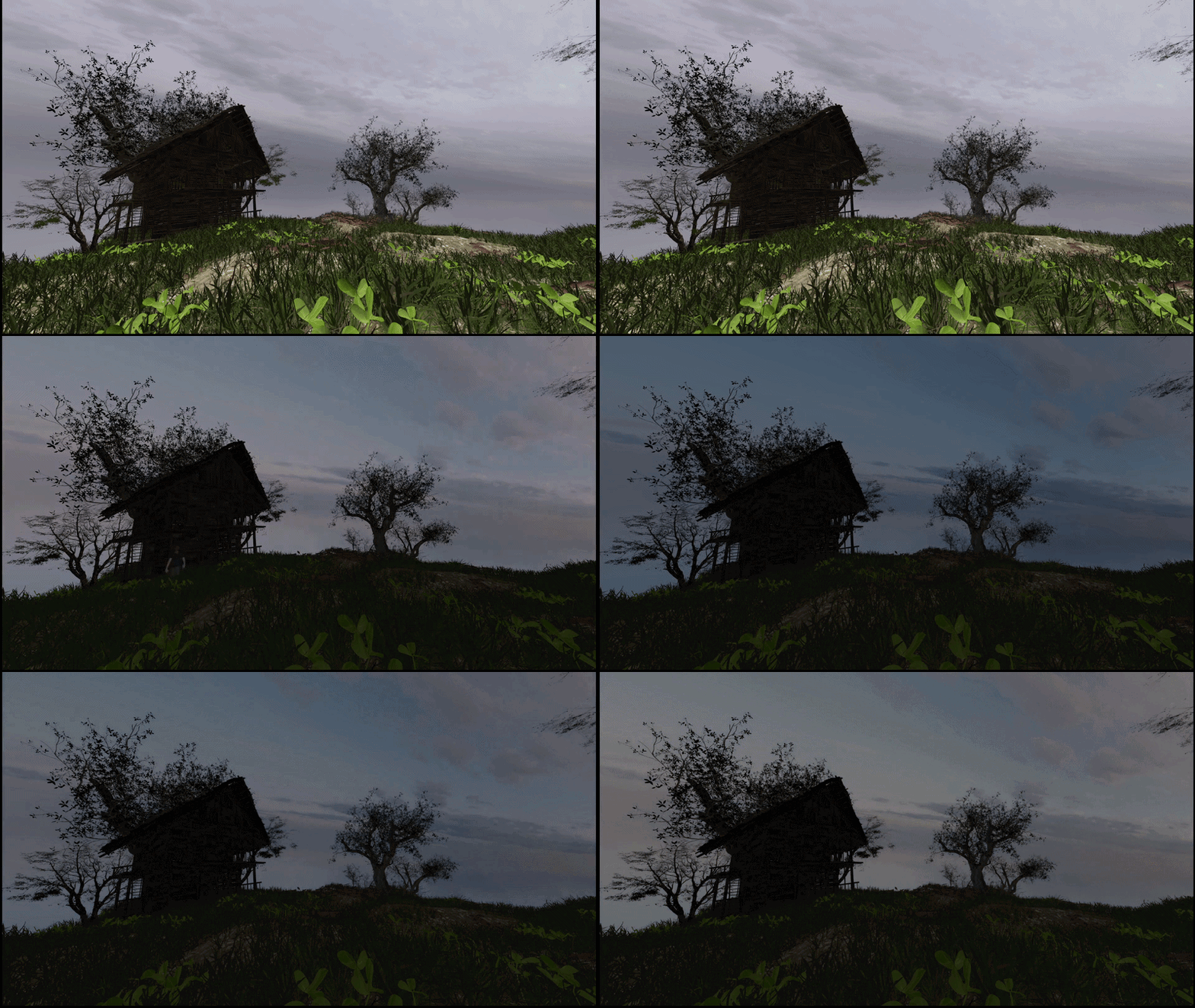
The skybox blends three cubemaps (day, noon, and night)
based on a day fraction that the game clock drives.
The fragment shader splits the day into ranges and
cross-fades between them, adding a warm tint during
sunrise and sunset. The same day fraction drives the
fogTint and dayBrightness
in the main fragment shader above, so the whole scene
transitions from day and night together.
Issues and Debugging
Multithreading
Azure's TTS runs asynchronously:
when I call startSpeaking,
it spawns a std::thread that kicks
off the Azure synthesizer, waits for the audio data,
sets up a miniaudio decoder, and starts playback.
Meanwhile the VisemeReceived callback
fires on Azure's own thread and pushes viseme entries
into the track. The render loop reads those entries
every frame from the main thread via sample().
So the three threads are using the same data: the render
, speech, and Azure's callback thread.
Without synchronization this caused a race condition.
The viseme track would get corrupted mid-read and
the face would either twitch or freeze randomly.
The fix was using std::mutex to guard the viseme
track and the weight arrays:
// faceAnimator.cpp - the three entry points lock the same mutex
void HTN::faceAnim::pushViseme(u32 ID, u32 offset) {
    std::lock_guard<std::mutex> lock(mtx);
    visemeEntry entry{ ID, offset };
    entries.push_back(entry);
}

std::vector<f32> HTN::faceAnim::sample() {
    std::lock_guard<std::mutex> lock(mtx);
    // ... read entries, compute weights
}

void HTN::faceAnim::startSpeaking(const std::string& text) {
    busy = true; // is a std::atomic<bool> so no lock is needed
    if (speakThread.joinable()) speakThread.join();
    {
        std::lock_guard<std::mutex> lock(mtx);
        entries.clear();
    }
    speakThread = std::thread([this, text] { /* azure + miniaudio */ });
}
The busy flag is a
std::atomic<bool>
so the render thread can check whether an
NPC is currently speaking without having to
take the lock every frame.
Discrete GPU Selection
During the hackathon demo, my laptop had both
an integrated GPU and a discrete one.
Vulkan was picking the integrated GPU by default,
which was the first device it found. The scene
was running at about 30 FPS. I added a preference
for VK_PHYSICAL_DEVICE_TYPE_DISCRETE_GPU
in the device selection loop for performance improvements (specifically for loading times):
// device.cpp - choose to prefer discrete GPU
for (const auto& dev : devices) {
    if (!isDeviceSuitable(dev)) continue;
    VkPhysicalDeviceProperties props;
    vkGetPhysicalDeviceProperties(dev, &props);
    if (props.deviceType == VK_PHYSICAL_DEVICE_TYPE_DISCRETE_GPU) {
        physicalDevice = dev;
        break;
    }
    if (physicalDevice == VK_NULL_HANDLE) {
        physicalDevice = dev;
    }
}
It still falls back to whatever is available if there is no discrete GPU.
Instancing
The first version of the scene loader copied every node's geometry into one giant vertex buffer with the world transform applied already. This worked but it had duplicate vertex data for every copy of the same mesh. With thousands of scattered grass clumps and trees in the Blender scene, I was unable to load the program at times since I did not have enough VRAM.
I rewrote it to use instanced rendering instead.
collectMeshInstances walks
the scene graph and groups nodes by their
mesh pointer, so it knows which meshes appear
more than once. Then buildInstancedMesh
loads each unique mesh once and packs the per-instance
world transforms into an SSBO. The draw call uses
vkCmdDrawIndexed with the instance count,
and the vertex shader indexes into the transform SSBO
with gl_InstanceIndex + instanceOffset per
submesh. This produced the same visual result but used much less memory.
Overall Thoughts
This was my 2nd hackathon and it was a really fun event. I went in mainly just wanting to mess around with the JALI and S3 papers and see if I could get something working with Vulkan and graphics, so I was genuinely surprised with how the faces turned out and that we made it to the semifinals.